What are headers in HTML?
In the context of a web page, “headers” usually refers to HTML heading elements —<h1> through <h6>—that label sections of content.
| Tag | Typical purpose | How many per page? |
|---|---|---|
<h1> | Page’s main topic (visible headline) | One is best practice |
<h2> | Major subsections | As many as needed |
<h3>–<h6> | Nested sub‑topics inside those sections | As depth requires |
Why they matter
- Information hierarchy – They create an outline that screen readers, browsers, and LLM pipelines all rely on to understand page structure.
- SEO & answer engines – Search crawlers give extra weight to words inside headings when deciding relevance.
- User experience – Clear, sequenced headings let human visitors scan and skip to what they need quickly.
What they are not
- HTTP headers – Key‑value pairs that travel in a request/response (e.g.,
Content-Type: text/html). - Graphic headers – Visual banners or hero images; those are layout elements, not semantic headings.
Keep headings sequential (<h2> under <h1>, <h3> under <h2>, etc.) and always follow a heading with real content—text, image (with alt), code block, table, etc.—so both people and machines get immediate context.
Key take‑aways
- HTML headings remain a low‑effort, high‑return signal for both traditional search ranking and modern answer‑engine / RAG pipelines.
- LLMs parse raw HTML more accurately than flattened text; losing
<h1>–<h4>structure hampers retrieval and increases hallucinations. - Practical rule‑of‑thumb: one accurate
<h1>that states the intent, logical<h2>/<h3>nests, and keep each heading‑bounded section under ~800 tokens for chunk‑level indexing.
| What headings influence | How Google confirms it |
|---|---|
| Relevance scoring & SERP snippets | Google’s Search Essentials singles out “the main heading” as a place to surface query words (Google for Developers) |
| Result clustering / sitelinks | Gary Illyes reiterates that heading hierarchy helps Google understand topics and sub‑topics (Search Engine Journal) |
| Crawling efficiency & accessibility signals (page experience) | W3C tutorial: correct rank order (→…) clarifies sections for assistive tech (W3C) |
| UX metrics that feed engagement‑based ranking | Clear headings cut pogo‑sticking and improve Core Web Vitals “Interaction to Next Paint” via quicker orientation (Mangools recap with John Mueller quote) (mangools) |
General rules I (Flavio) follow when structuring content with headers:
1. Never jump i.e. from <h2> to <h4>
Keep levels sequential within a branch (H2 → H3 → H4). When you’re done, step back out in order (H4 → H3 → H2).
| Verdict | Why |
|---|---|
| Generally sound | WCAG and W3C tutorials warn that “skipping heading ranks can be confusing” for assistive tech, so an <h2> immediately followed by an <h4> is flagged as a potential accessibility issue. W3CPope Tech Blog |
| Nuance | A new major section may legitimately start with an <h2> after you closed a deeply nested <h4> subsection. That isn’t a “jump”; it’s just unwinding the hierarchy. W3C |
| SEO / LLM impact | Search engines and vector‑based retrieval don’t penalise level‑skips directly, but a clean outline improves crawl efficiency, snippet generation and chunk‑level recall. Search Engine JournalSearch Engine Land |
2. Every header must have some content (p, img, table)
- Never leave an empty
<h*>element. - Prefer at least a short intro paragraph (or an imbedded component with alt text) before plunging into sub‑headings—this helps both accessibility and embedding quality.
| Verdict | Why |
|---|---|
| Correct for accessibility | Empty heading tags trigger “Empty heading” errors because screen‑reader users hit a heading with no context. Equalize DigitalPope Tech Blog |
| But not an absolute HTML requirement | A heading may legitimately introduce a cluster of lower‑level headings without its own paragraph. From an information‑architecture view that’s fine, though you still need non‑empty heading text. |
| LLM / RAG angle | Vector chunkers (Azure Document Layout, LangChain, etc.) split on headings and expect some token count below each one; a totally barren section becomes a low‑signal chunk. Including a 1‑‑2‑sentence lead‑in or an illustrative figure keeps chunks meaningful. Microsoft Learn |
Adding Anchor Text Navigation for Deep Linking
Anchor text navigation helps both users and search engines identify and access specific parts of a long article. By adding unique IDs (id="") to each heading and linking them internally, you create structured, crawlable paths. This enables search engines and LLM crawlers to deep link to meaningful sections, which can surface as “jump to” links or featured snippets in the SERP.
Why it matters for SEO and LLM visibility
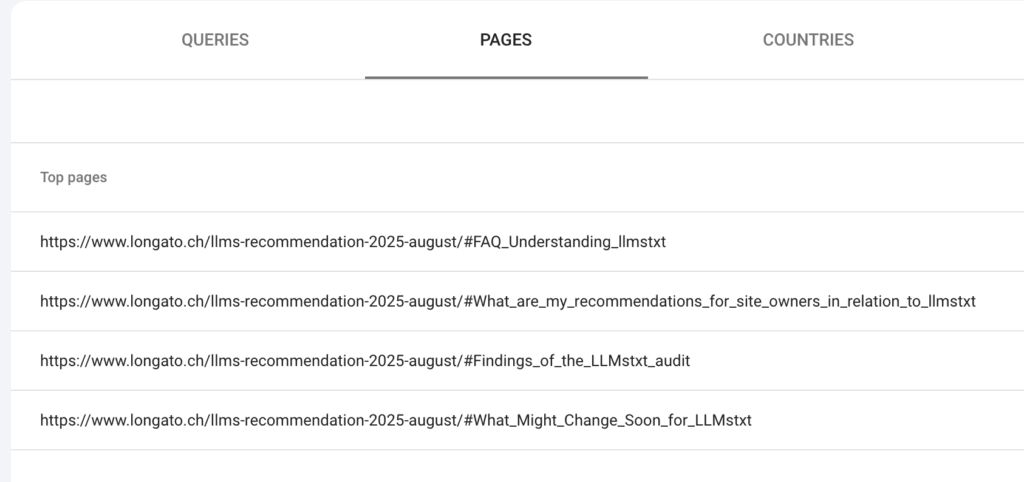
- Deep linking: Google can display direct links to subsections (e.g., “Jump to What are headers in HTML?”).
- Improved understanding: LLMs parse structured anchors to map content relationships and context more accurately.
- User experience: Visitors can quickly navigate long-form content, reducing bounce rates and increasing time on page.
Best practices
- Assign unique, descriptive
idattributes to each heading (e.g.,id="why-headers-matter"). - Use consistent naming conventions — avoid stop words and spaces in IDs.
- Ensure internal links reference those IDs with
<a href="#why-headers-matter">. - Validate links using browser inspector or Lighthouse to confirm all anchors resolve correctly.
Example implementation
<h2 id="headers-in-html">What are headers in HTML?</h2>
<p>Headers provide content hierarchy and context...</p>

<a href="#headers-in-html">Jump to headers section</a>
Proper anchor-based navigation not only helps Google render sitelinks but also assists LLMs in parsing context at sub-document granularity — a key factor for prompt-driven visibility.
Example in this article:
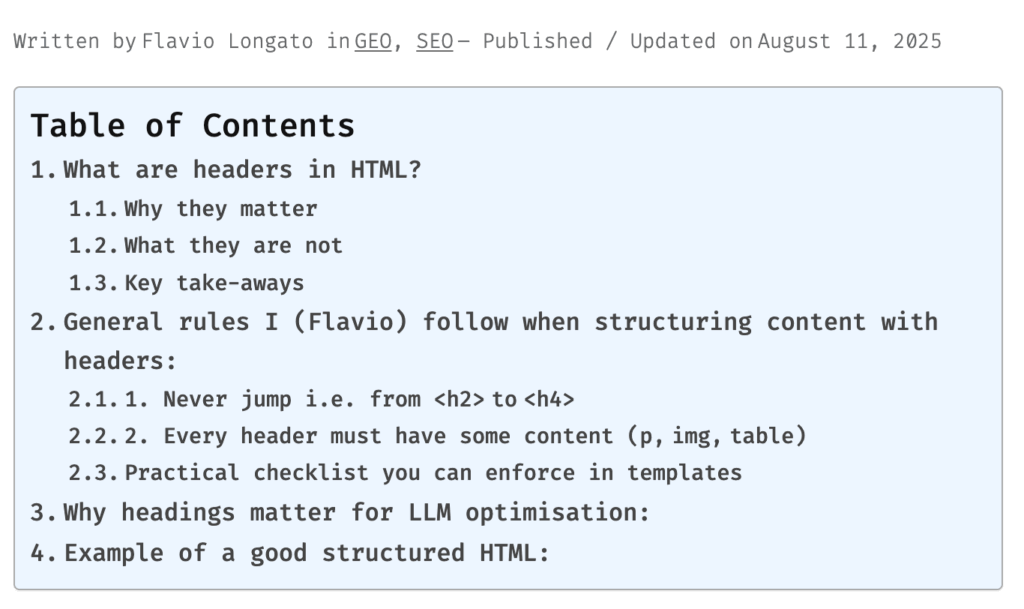
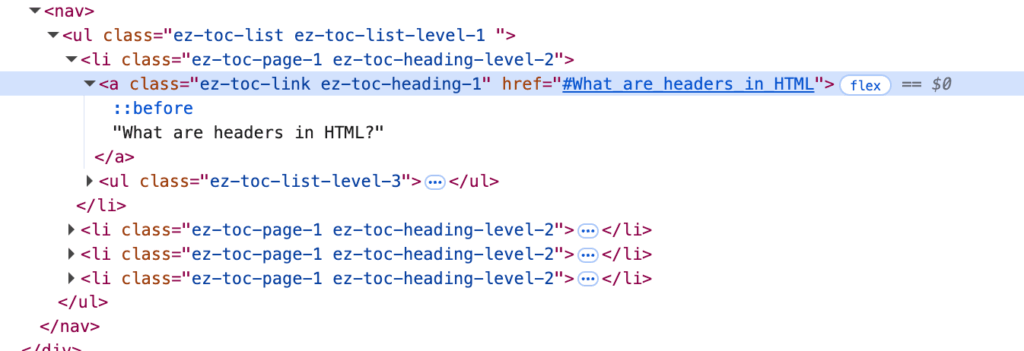
Because of this implementation, search engines will show that specific section
Practical checklist you can enforce in templates
Follow those refinements and your existing rules will serve both accessibility guidelines and modern LLM‑powered search without introducing unnecessary rigidity.
| Check | Pass criteria |
|---|---|
| Sequential levels | Run a crawler test: flag any instance where rank(current) > rank(previous)+1. |
| Non‑empty headings | Reject builds containing <hN></hN> or headings whose visible text trims to zero characters. |
| Token budget | Keep heading‑bounded sections 100‑‑800 tokens; if shorter, merge; if longer, split with an extra sub‑heading. |
| Author training | Teach writers that a heading is a promise: immediately satisfy it with one clear idea (text, figure, code block, etc.). |
Why headings matter for LLM optimisation:
| LLM/RAG concern | Impact of keeping HTML headings |
|---|---|
| Semantic chunking | Azure Document Intelligence recommends splitting documents on section headers to preserve meaning (Microsoft Learn) |
| Information loss in plain‑text pipelines | The 2025 HtmlRAG study shows headings are among the first things lost when HTML is flattened—hurting answer accuracy (arXiv) |
| Vector search recall | Pinecone (2025) notes that chunk‑level retrieval works when a chunk “makes sense without surrounding text”—heading‑bounded chunks satisfy that rule (pinecone.io) |
keep headings in the source you embed or feed into a vector DB; strip presentation CSS, not the structural tags.
| Area | Do | Avoid |
|---|---|---|
<h1> | One per URL; front‑load the primary key‑phrase but keep it human ( ≤ 60 chars). | Keyword‑stuffing or duplicating the title tag verbatim. |
| Hierarchy | Step down sequentially (<h2>, <h3>, <h4>). It’s OK to have many <h2> siblings. | Jumping levels (e.g., <h2> → <h4> with no <h3>). |
| Chunk length for RAG | Keep each heading‑delimited section under ~800 tokens; add a 50‑token overlap if you split programmatically. | Fixed‑width splits that ignore headings for semantically rich pages. |
| Accessibility boost | Write headings that describe the section (“Installation steps”, not “Section 2”). Helps screen‑reader navigation (W3C) | Styling a paragraph to look like a heading without the tag. |
| AEM / CMS hygiene | Enforce heading components in content fragments; block inline CSS that overrides native <h*> sizing. | Allowing authors to choose heading size purely for visual effect. |
| Monitoring | Crawl your site weekly and flag pages missing <h1> or with > 120 chars in any heading. | Relying on manual QA; issues slip in fast at enterprise scale. |
Example of a good structured HTML:
<!-- Example page: Urban Balcony Gardening – The Complete Guide -->

<h1>Urban Balcony Gardening: The Complete Guide</h1>
<p>From São Paulo to Singapore, city dwellers are converting concrete perches into productive micro‑gardens. This guide distills first‑hand lessons, data‑backed tips, and a pinch of experimentation so you can harvest greens above the street noise.</p>

<h2>1. Why Grow on a Balcony?</h2>
<p>Rent increases may be out of your control, but fresh basil isn’t. Balcony gardens supply hyper‑local produce, buffer street dust, and create a calming ritual that offsets screen time.</p>

  <h3>1.1 Key Benefits</h3>
  <p>Edible foliage reduces food miles to zero, and the act of tending plants lowers cortisol levels according to a 2024 University of Helsinki study. Plus, a lush rail‑box can nudge real‑estate photos up a price tier.</p>

  <h3>1.2 Limitations to Plan For</h3>
  <p>Most balconies offer erratic wind tunnels and less than seven hours of sunlight. Weight restrictions typically hover around 350 kg / m²—double‑check your building code before adding ceramic planters.</p>

<h2>2. Planning Your Space</h2>
<p>A well‑planned 3 m² balcony can outperform a careless 10 m² terrace. Sketch zones for seating, vertical trellises, and a hidden compost bucket before buying a single seed packet.</p>

  <h3>2.1 Measuring Light and Wind</h3>
  <p>Track shadow shifts every two hours for a full day. A phone gimbal and time‑lapse mode capture the data without babysitting the camera.</p>

    <h4>2.1.1 Using Sun‑Tracking Apps</h4>
    <p>Apps like SunCalc overlay azimuth angles on live AR. Export the CSV to spot high‑radiation pockets where peppers will actually blush red.</p>

  <h3>2.2 Choosing Safe Containers</h3>
  <p>Look for food‑grade HDPE symbols and avoid recycled PVC if you intend to grow root vegetables.</p>

    <h4>2.2.1 Pot Materials Compared</h4>
    <p>Fabric grow‑bags breathe well but dry quickly; glazed terracotta retains moisture yet can crack in freeze‑thaw cycles. Stainless steel buckets are indestructible but flash‑cook roots in midsummer unless shaded.</p>

<h2>3. Picking the Right Plants</h2>
<p>Ignore glossy seed‑catalog photos. Instead, shortlist cultivars tested in balcony labs—compact habit, shallow roots, and shade tolerance matter more than botanical exotica.</p>

  <h3>3.1 Herbs That Thrive in Pots</h3>
  <p>‘Genovese Compact’ basil bulks up without bolting, while Vietnamese coriander laughs at humid nights that fell supermarket cilantro.</p>

  <h3>3.2 Compact Vegetables</h3>
  <p>Try ‘Patio Star’ zucchini: each plant tops out at 45 cm yet still kicks out fist‑sized fruit. Harvest every three days or it will outgrow its welcome.</p>

  <h3>3.3 Ornamental Flowers</h3>
  <p>Calendula doubles as pollinator magnet and salve ingredient. Deadhead spent blooms to keep colour going until first frost.</p>

<h2>4. Care and Maintenance Schedule</h2>
<p>Consistency beats intensity. Ten minutes daily with a moisture meter saves you an hour of emergency triage later.</p>

  <h3>4.1 Watering by Season</h3>
  <p>Morning soak in July, dusk sprinkle in January. Bottom‑watering trays cut losses during weekend trips.</p>

  <h3>4.2 Fertilising Without Overdoing It</h3>
  <p>Alternate kelp emulsion and worm‑casting tea on a 14‑day cadence. Skip feedings the week before harvesting leafy greens to avoid nitrate spikes.</p>

  <h3>4.3 Pest Detection Checklist</h3>
  <p>Inspect undersides of leaves on Wednesdays and Saturdays, brush off aphids with a soft paintbrush, and quarantine any plant that hosts more than ten scale insects.</p>

<h2>5. Troubleshooting Common Issues</h2>
<p>Even veteran growers lose a seedling now and then. Instead of panic‑pruning, match symptoms to likely causes and adjust a single variable at a time.</p>

  <h3>5.1 Yellowing Leaves</h3>
  <p>Chlorosis often signals iron lockout in alkaline potting mixes—flush with rainwater before reaching for supplements.</p>

  <h3>5.2 Slow Growth</h3>
  <p>If day‑night temperature swings exceed 12 °C, metabolic slowdown is inevitable. A clear polycarbonate panel acts as a windbreak and thermal buffer.</p>

  <h3>5.3 Balcony Weight Limits</h3>
  <p>Swap soil for coco‑coir and perlite blend to halve payload. Group heavy containers near support columns rather than cantilevered corners.</p>

<h2>6. Final Thoughts and Next Steps</h2>
<p>Document every win and flop in a shared spreadsheet; patterns emerge after two seasons. When neighbours peek over the railing, hand them a homegrown cherry tomato—community is the best fertiliser of all.</p>